

Skip to content

LEGO Trend AI: Turn Your Photo Into a Toy Brick Minifigure Video

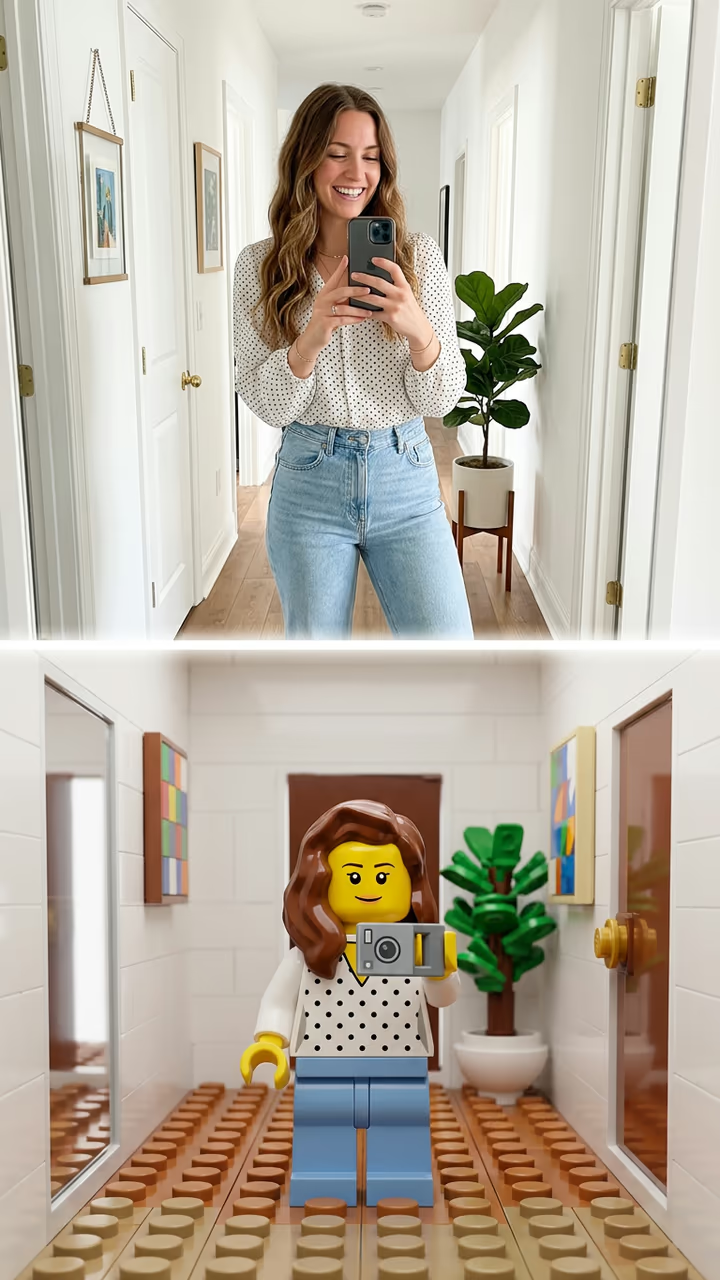
From one photo, a short video starts on your real picture, flashes white and rebuilds the same scene as a plastic toy brick world, with you as a yellow toy minifigure in the same pose and outfit.

LEGO Trend AI · switch effect

Your photo

One adult or one pet, whole body or knees up works best, sharp and in good light. A mirror selfie is fine.

Cost shown before you run · failed runs are refunded

  • Ready in 1–3 min
  • No watermark
  • Failed runs refunded
  • Uploads never published

This trend on Instagram & TikTok

The most-watched videos of this trend, shown with credit and a link to each original post. Videos belong to their creators; they were not made with Soracai.

  1. 1

    @myersbwqhm9

    Trend video

    TikTok

    422K views · 56K likes · November 20

    Mirror selfie, flash, minifigure: 422K

    Watch on TikTok ↗
  2. 2

    @user639330261459

    Trend video

    TikTok

    326K views · 52K likes · November 19

    “Turned into LEGO”: 326K

    Watch on TikTok ↗

How to use the LEGO Trend AI: Turn Your Photo Into a Toy Brick Minifigure Video

  1. 01

    Upload a photo

    Your photo: One adult or one pet, whole body or knees up works best, sharp and in good light. A mirror selfie is fine..

  2. 02

    Press Generate

    The LEGO Trend AI effect runs on its own tuned settings. It costs 140 credits, shown on the button before you run it.

  3. 03

    Download

    Your video is ready in one to three minutes. Download the MP4 without a watermark.

What is the LEGO Trend AI: Turn Your Photo Into a Toy Brick Minifigure Video?

Your photo flashes white and comes back as a toy: the same room, the same pose and the same outfit, but built from plastic bricks, with you as a little yellow minifigure. That is the LEGO trend, one of the most copied photo-to-video effects on TikTok in November 2026, and this template makes it from one photo.

It grew in Russia and Ukraine first, under the caption "превратился в лего" ("turned into LEGO") and a sound built around the line "I am LEGO, fifteen thousand pieces". A post with that sound on 7 November reached 745,000 views. On 19 and 20 November two CapCut template posts showed the format itself: a mirror selfie, a white flash and the same picture as a brick scene. They passed 326,000 and 422,000 views with more than 50,000 likes each, and template sites added a photo to LEGO page the same week.

This template starts the video on your own photo, so the first second is really you. Then the flash hits and the model rebuilds the scene as toy bricks, keeping your hair colour, outfit, pose and props on the minifigure. You get an 8-second vertical video with sound, no watermark, ready for TikTok, Reels and Shorts. The trend videos on this page are credited to their creators; the poster image is AI-generated.

What happens in the video

The video opens on your real photo with a tiny movement. A white flash fills the screen, and the same picture comes back rebuilt from plastic bricks: walls, floor and furniture with round studs, and you as a yellow toy minifigure with your hair, outfit and pose. The toy does a little wiggle while the camera pushes in.

Which photo to use

One adult or one pet, whole body or knees up, sharp and in good light. Use your own photo or one of a friend who said yes. Photos of children are not accepted.

LEGO Trend AI: Turn Your Photo Into a Toy Brick Minifigure Video FAQ

How do I do the LEGO trend with AI?

Upload one clear photo and press Generate. You get an 8-second vertical clip that starts on your photo, flashes and turns the whole scene into toy bricks with you as a minifigure.

Is it free?

Video templates use paid credits. New accounts get free credits for photo templates only. The exact cost is shown on the Generate button before you confirm.

Does the video have sound?

Yes: brick clicks, a flash and an original playful tune. It is not the trend's original sound; you can add that in TikTok or CapCut when you post.

Can I turn my pet into a LEGO-style toy?

Yes. A dog, cat or other pet becomes a plastic toy animal figure in a brick version of the same scene.

Where did the LEGO trend start?

It grew on Russian-speaking TikTok in November 2026 with the caption "превратился в лего" ("turned into LEGO"). CapCut template posts on 19 and 20 November showed the photo-flash-toy format and passed 300,000 to 400,000 views each.

Is this affiliated with LEGO, CapCut or TikTok?

No. Soracai is not affiliated with, sponsored or endorsed by the LEGO Group, CapCut, TikTok or any creator mentioned on this page. "LEGO trend" is the name of the trend, used because that is what people search for. The video shows generic toy bricks and a generic minifigure with no brand marks.

Is there a watermark?

No watermark is added to the video.

Where is my photo stored?

Uploads are stored in Firebase Storage (Google Cloud) under your account so the run can happen and the result appears in Creations. They are not public, and you can email support to request deletion. To run the effect, a copy is sent to our AI model provider (kie.ai); result files are kept for 14 days, so download what you want to keep.

More AI effects

Try the LEGO Trend AI: Turn Your Photo Into a Toy Brick Minifigure Video

Upload a photo and get your video in a couple of minutes.

Upload photo