



Skip to content

Skull Cap Trend AI Generator: Goofy Before, Serious After

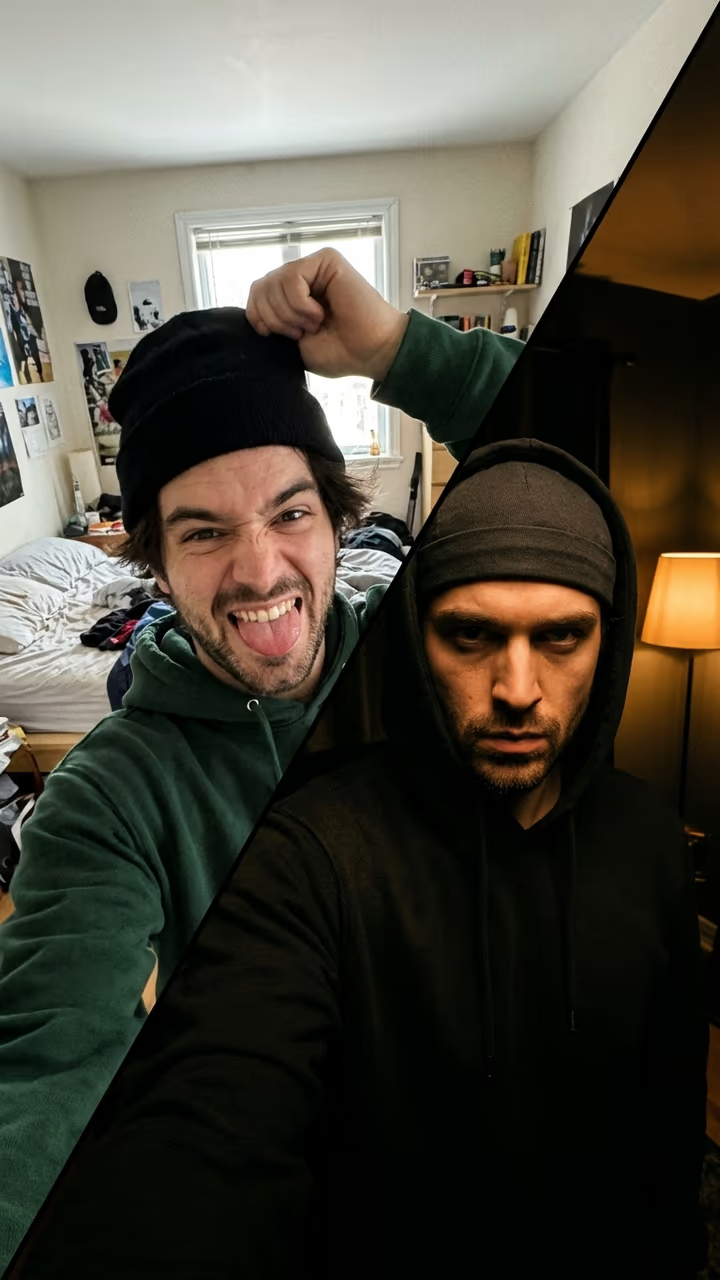
A bright, messy before where you pull a silly face and fiddle with a beanie, then a hard cut on the beat to a dim room, hood up, skull cap on and a slow, serious stare into the lens: the viral skull cap transformation with your own face.

Skull Cap Trend · switch effect

Your photo

One adult, face clear and toward the camera, head and shoulders. Hair and clothes can be anything: you get a hoodie and a skull cap.

Cost shown before you run · failed runs are refunded

  • Ready in 1–3 min
  • No watermark
  • Failed runs refunded
  • Uploads never published

This trend on Instagram & TikTok

The most-watched videos of this trend, shown with credit and a link to each original post. Videos belong to their creators; they were not made with Soracai.

  1. 1

    @connors_archives

    Trend video

    TikTok

    14.2M views · 1.9M likes · October 14

    “How dudes be 0.1 seconds after putting on that skull cap”: the 14.2M original

    Watch on TikTok ↗
  2. 2

    @grumpyleanneandmaitland

    Trend video

    TikTok

    12.5M views · 1.8M likes · October 21

    “My mum made me do this”: the 12.5M version

    Watch on TikTok ↗
  3. 3

    @brodyjboling

    Trend video

    TikTok

    10M views · 1.5M likes · October 23

    “I did the trend now stop tagging me”

    Watch on TikTok ↗
  4. 4

    @d_cortez31

    Trend video

    TikTok

    3.2M views · 459K likes · October 16

    Curly-haired before at the desk, hooded after

    Watch on TikTok ↗

How to use the Skull Cap Trend AI Generator: Goofy Before, Serious After

  1. 01

    Upload a photo

    Your photo: One adult, face clear and toward the camera, head and shoulders. Hair and clothes can be anything: you get a hoodie and a skull cap..

  2. 02

    Press Generate

    The Skull Cap Trend effect runs on its own tuned settings. It costs 140 credits, shown on the button before you run it.

  3. 03

    Download

    Your video is ready in one to three minutes. Download the MP4 without a watermark.

What is the Skull Cap Trend AI Generator: Goofy Before, Serious After?

The skull cap trend is a two-part transformation: in a bright, messy room you pull a silly face and fiddle with a beanie, then the beat drops, the light goes dim, the hood goes up over a skull cap and you give the camera a slow, serious stare. The caption is the joke, usually "How dudes feel 0.1 seconds after putting on a skull cap". Upload one photo and this template makes both halves with your face.

The trend took off in mid-October 2026. On 14 October a goofy-before, hooded-after clip passed 14 million views and 1.9 million likes, on 16 October another passed 3 million, and from 21 October two more crossed 12.5 million and 10 million, with mums, girlfriends and older men joining in. By late October the #skullcap hashtag held tens of thousands of videos.

The template runs in two steps: an image model sets up the bright "before" with your face, then a video model plays the silly part, the hard cut and the moody "after" with the hood and the stare, over an original R&B beat with a bass drop on the cut. You get an 8-second vertical clip with no watermark. The trend videos on this page are credited to their creators; the poster image is AI-generated.

Why the skull cap trend works

It is the contrast. The before is as goofy and bright as possible, the after is dark, slow and dead serious, and the cut lands exactly on the beat. The joke is how fast one beanie turns anyone into the moody main character.

Which photo to use

One adult, alone in the picture, face clear and toward the camera, head and shoulders in view. Even light on the face keeps it recognisable in the dim after shot.

Skull Cap Trend AI Generator: Goofy Before, Serious After FAQ

How do I do the skull cap trend with AI?

Upload one clear photo of yourself and press Generate. You get an 8-second clip: a goofy, bright before, a cut on the beat, and a dim after with the hood up, a skull cap on and a serious stare.

Is it free?

Video templates use paid credits. New accounts get free credits for photo templates only. The exact cost is shown on the Generate button before you confirm.

What song is the skull cap trend?

The trend sound is a TikTok clip of a verse from "Wild Thoughts". This template does not use it: the clip has an original moody R&B beat. Add the trending sound yourself in TikTok or CapCut.

Do I need to own a skull cap or a hoodie?

No. The template adds the hoodie and the skull cap; your photo only gives the face.

Is this affiliated with TikTok or the song's artists?

No. Soracai is not affiliated with TikTok, CapCut, the artists of "Wild Thoughts" or the creators of the trend clips. The template makes its own scenes from your photo.

Is there a watermark?

No watermark is added to the video.

Where is my photo stored?

Uploads are stored in Firebase Storage (Google Cloud) under your account so the run can happen and the result appears in Creations. They are not public, and you can email support to request deletion. To run the effect, a copy is sent to our AI model provider (kie.ai); result files are kept for 14 days, so download what you want to keep.

More AI effects

Try the Skull Cap Trend AI Generator: Goofy Before, Serious After

Upload a photo and get your video in a couple of minutes.

Upload photo