Skip to content

Anime Eye Trend AI Photo

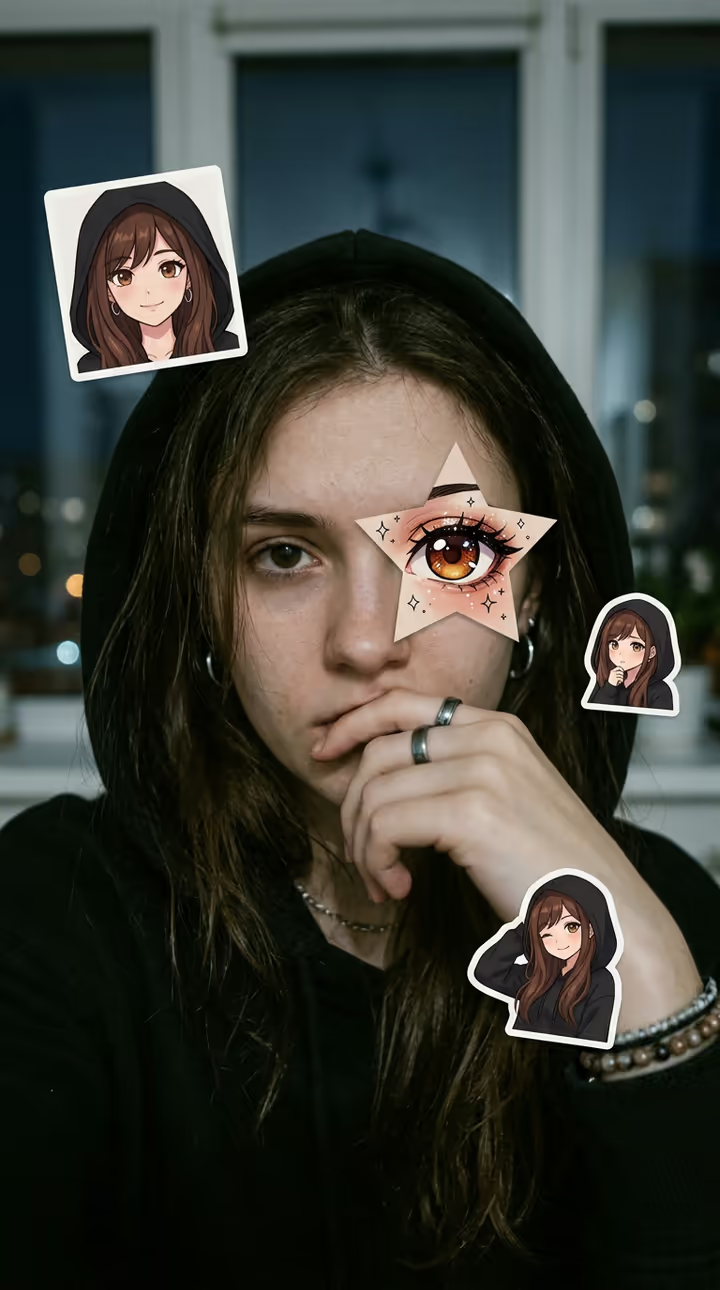
One selfie becomes the anime star eye photo: AI draws your own original anime twin, puts a star-shaped cut-out of its eye over your eye and adds anime stickers of your twin around you.

Anime Eye Trend · switch effect

Your selfie

One adult, face close, at least one eye big and sharp; a hood or a hand over the mouth fits the trend

Cost shown before you run · failed runs are refunded

  • Ready in ~15 s
  • No watermark
  • Failed runs refunded
  • Uploads never published

This trend on Instagram & TikTok

The most-watched videos of this trend, shown with credit and a link to each original post. Videos belong to their creators; they were not made with Soracai.

  1. 1

    @lris1599

    Trend video

    TikTok

    206K views · 3,088 likes · October 18

    The anime star eye photo and how to make it

    Watch on TikTok ↗
  2. 2

    @sergiosue936

    Trend video

    TikTok

    151K views · 10K likes · October 20

    More star eye results

    Watch on TikTok ↗
  3. 3

    @yingdghtk9x

    Trend video

    TikTok

    150K views · 11K likes · October 19

    Star eye photos with anime stickers

    Watch on TikTok ↗

How to use the Anime Eye Trend AI Photo

  1. 01

    Upload a photo

    Your selfie: One adult, face close, at least one eye big and sharp; a hood or a hand over the mouth fits the trend.

  2. 02

    Press Generate

    The Anime Eye Trend effect runs on its own tuned settings. It costs 10 credits, shown on the button before you run it.

  3. 03

    Download

    Your photo is ready in about 15 seconds. Download it without a watermark.

What is the Anime Eye Trend AI Photo?

The anime eye trend, also called the anime star eye trend or the anime face trend, is the selfie edit taking over TikTok in October 2026. You post a moody selfie, half your face hidden under a hood or behind your hand, and a star-shaped cut-out of an anime eye sits exactly over one of your real eyes, with small anime stickers around you: "the anime character I look like".

The format spread fast. In early October, photos from Vietnam with anime faces pasted over friends' faces passed 1.8 million views; the star-eye version followed from Kazakhstan on 16 and 17 October, with one post passing 1.3 million views. By 19 October English how-tos for the anime star eye trend were everywhere, three of them passing 150,000 to 200,000 views each, and #animeeyetrend had more than 1.6 million views.

Most people make it by hunting for an anime character who looks like them. This template skips that: from one selfie, the AI draws your own original anime twin, with your hair, eye colour and outfit, puts its eye in the star over yours and adds three or four sticker panels of your twin around you. Your real photo stays as it is. The result is a vertical 9:16 photo made with Nano Banana 2, with no watermark. The trend posts on this page are credited to their creators; the poster image is AI-generated.

Your own anime twin, not a borrowed character

In the trend, people search for a screenshot of an anime character who looks like them. Here the AI draws an original character from your selfie instead, so the stickers really look like you and you do not need to find or crop anything.

Make it a video

The trend posts are photos set to a sound. Post the image with the trending sound on TikTok, or put it in a slideshow with your original selfie first and the anime eye version second.

Anime Eye Trend AI Photo FAQ

What is the anime eye trend?

A TikTok selfie edit from October 2026: a star-shaped cut-out of an anime eye sits over one of your real eyes, with small anime stickers around you, usually set to a moody sound.

How do I do the anime star eye trend with AI?

Upload one close selfie and press Generate. The AI draws your own anime twin, puts its eye in a star over yours and adds three or four sticker panels around you.

Is it free?

New accounts get free credits for photo templates, so you can try it at no cost. More runs use credits from a pack or plan, and the cost is shown before you generate.

Will it use a character from an existing anime?

No. The template draws an original anime-style twin based on your own hair, eyes and outfit, not a character from any series. Soracai is not affiliated with any anime studio.

Does it change my real face?

No. Your selfie stays as it is; the star and the stickers are added on top.

Is there a watermark?

No. Images download without a watermark.

Where is my photo stored?

Uploads are stored in Firebase Storage (Google Cloud) under your account so the run can happen and the result appears in Creations. They are not public, and you can email support to request deletion. To run the effect, a copy is sent to our AI model provider (kie.ai); result files are kept for 14 days, so download what you want to keep.

More AI effects

Try the Anime Eye Trend AI Photo

Upload a photo and get your photo in seconds.

Upload photo