Skip to content

AI Hair Dye Filter

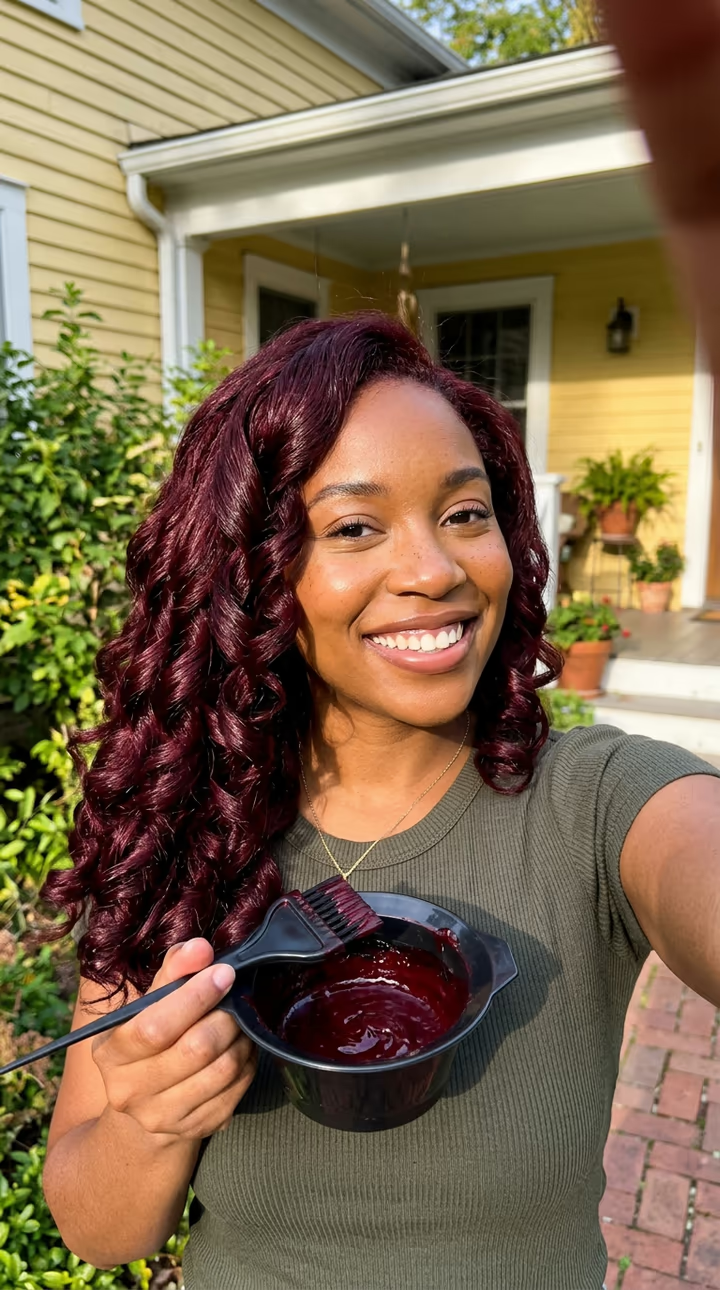
You brush red dye into your hair, then it is long, glossy and burgundy, a flat iron glides down it and it ends in big curls.

AI Hair Dye Filter · switch effect

Your selfie

One adult, face and hair clearly visible, good light

Cost shown before you run · failed runs are refunded

  • Ready in 1–3 min
  • No watermark
  • Failed runs refunded
  • Uploads never published

This trend on Instagram & TikTok

The most-watched videos of this trend, shown with credit and a link to each original post. Videos belong to their creators; they were not made with Soracai.

  1. 1

    @harmie_273

    Trend video

    TikTok

    2.75M views · 260K likes · October 14

    The clip that made the trend blow up

    Watch on TikTok ↗
  2. 2

    @beauty.presh232

    Trend video

    TikTok

    1.19M views · 105K likes · October 15

    Dye, flat iron, curls

    Watch on TikTok ↗
  3. 3

    @jio46683

    Trend video

    TikTok

    904K views · 29K likes · October 16

    How-to: the AI hair dye filter

    Watch on TikTok ↗
  4. 4

    @bipanabhattarai279

    Trend video

    TikTok

    269K views · 4,972 likes · October 11

    The first wave, for Dashain in Nepal

    Watch on TikTok ↗

How to use the AI Hair Dye Filter

  1. 01

    Upload a photo

    Your selfie: One adult, face and hair clearly visible, good light. Hair colour (optional): e.g. copper, platinum blonde, cherry red, jet black.

  2. 02

    Press Generate

    The AI Hair Dye Filter effect runs on its own tuned settings. It costs 140 credits, shown on the button before you run it.

  3. 03

    Download

    Your video is ready in one to three minutes. Download the MP4 without a watermark.

What is the AI Hair Dye Filter?

The AI hair dye filter shows you with a new hair colour before you touch a box of dye. Upload one clear selfie and you get a short phone video in the style of a salon transformation reel. It opens with you outdoors in warm daylight, holding a bowl of thick dark red dye and brushing it onto your hair. Then the video jumps: your hair is long, straight and glossy, fully burgundy, and a flat iron glides down one section. One more jump and it falls in big, bouncy curls; you run a hand through it, flip it over your shoulder and smile at the camera. Type a colour in the box (copper, platinum blonde, cherry red) and the dye and the result change to match.

The trend comes from a CapCut AI template that went around Nepal during the Dashain festival on 11 October 2026, then exploded in Nigeria and West Africa. One clip from 14 October passed 2.7 million views and 260,000 likes; its top comment joked that the new hair looks too real to be AI. Another passed 1.1 million the next day, and an English how-to passed 900,000.

The template runs in two steps: an image model builds the opening frame with the dye bowl from your selfie, then a video model plays the transformation with sound. The clip is 8 seconds, vertical and watermark-free. The trend videos on this page are credited to their creators; the poster image is AI-generated.

How the transformation is built

The first step turns your selfie into the opening frame of the trend: you hold the dye bowl and the brush at your hairline, outdoors, in the same clothes. Starting from that frame keeps your face and outfit locked while the hair changes.

The second step is the reel itself: brushing, a cut to long straight dyed hair under a flat iron, and a cut to big curls with a proud smile. That three-beat structure is what every viral clip of the trend shares.

Choosing a colour

The trend is burgundy, and the template uses it by default. Any single colour works in the box: copper, honey blonde, platinum, cherry red, blue-black or pastel pink. The colour of the dye in the bowl and the final hair always match, so the clip reads as one real dye job.

AI Hair Dye Filter FAQ

How do I use the AI hair dye filter?

Upload one clear selfie, optionally type a hair colour, and press Generate. You get an 8-second video of you dyeing, straightening and curling your new hair.

Is it free?

Video templates use paid credits. New accounts get free credits for photo templates only. The exact cost is shown on the Generate button before you confirm.

Can I choose a different hair colour?

Yes. Type it in the colour box, for example copper, platinum blonde or cherry red. Leave it empty for the burgundy from the trend.

Is it a real camera filter?

No. Like the viral version, it is an AI template: it makes a new video from your photo, so nothing is applied live to your camera.

Does the video have sound?

Yes: brush sounds, the flat iron and a small laugh. Most people add the trending sound on top; mute ours in your editor if you do.

Is there a watermark?

No watermark is added to the video.

Where is my photo stored?

Uploads are stored in Firebase Storage (Google Cloud) under your account so the run can happen and the result appears in Creations. They are not public, and you can email support to request deletion. To run the effect, a copy is sent to our AI model provider (kie.ai); result files are kept for 14 days, so download what you want to keep.

More AI effects

Try the AI Hair Dye Filter

Upload a photo and get your video in a couple of minutes.

Upload photo