

Skip to content

GTA 5 Goodbye AI Trend: Your Farewell on the Sunset Pier

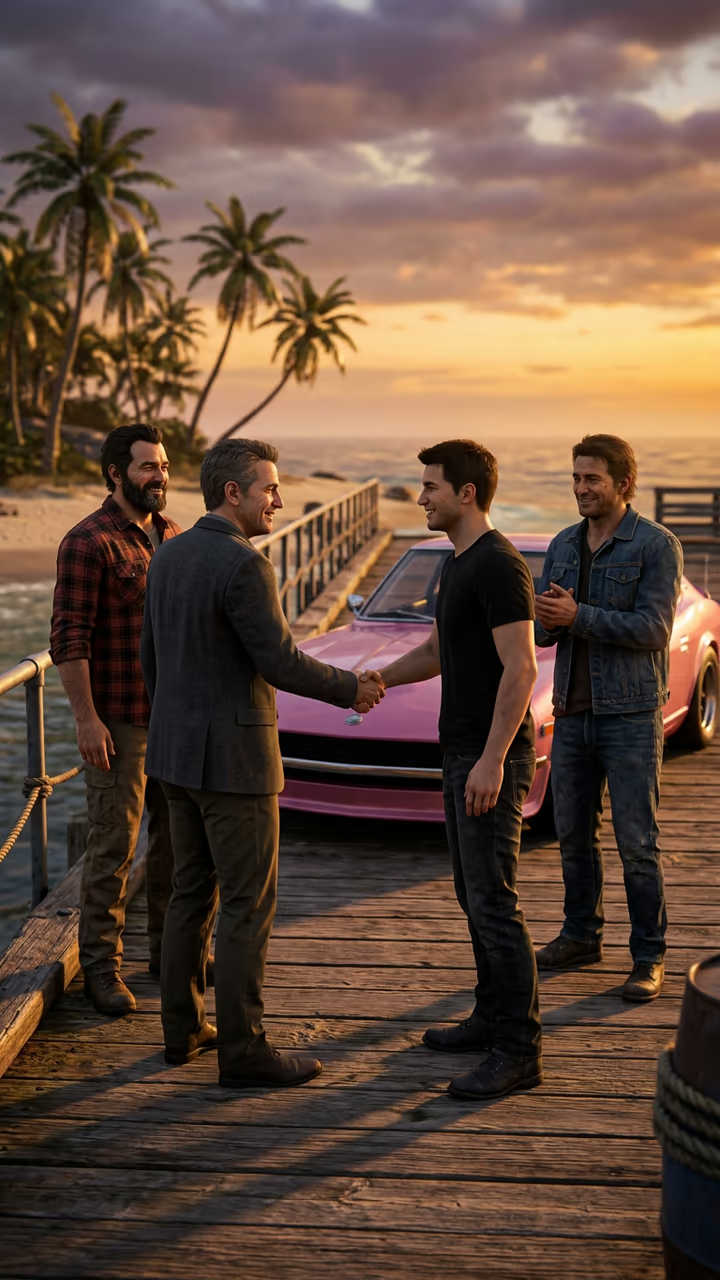
From one photo of you, a video-game-style farewell on a seaside pier at sunset: three old friends shake your hand and give you a parting gift, you say thanks with tears in your eyes, get into a pink sports car and drive off down the beach road. The viral GTA 5 goodbye trend, starring you.

GTA 5 Goodbye AI Trend · switch effect

Your photo

One adult, chest up, face clear and toward the camera, in good light. A T-shirt or casual top fits the scene best.

Cost shown before you run · failed runs are refunded

  • Ready in 1–3 min
  • No watermark
  • Failed runs refunded
  • Uploads never published

This trend on Instagram & TikTok

The most-watched videos of this trend, shown with credit and a link to each original post. Videos belong to their creators; they were not made with Soracai.

  1. 1

    @alexander__lyrics

    Trend video

    TikTok

    2.01M views · 309K likes · November 10

    “Good bye Los Santos”: the farewell edit that started it, 2M

    Watch on TikTok ↗
  2. 2

    @capcut.templates5784

    Trend video

    TikTok

    545K views · 28K likes · November 14

    The AI goodbye filter result: 545k

    Watch on TikTok ↗
  3. 3

    @user6627237872233

    Trend video

    TikTok

    53K views · 1,209 likes · November 17

    Two AI goodbye results and how to make them

    Watch on TikTok ↗
  4. 4

    @bella.moore54

    Trend video

    TikTok

    42K views · 1,470 likes · November 16

    Sunset pier handshake, the gift and the pink car

    Watch on TikTok ↗

How to use the GTA 5 Goodbye AI Trend: Your Farewell on the Sunset Pier

  1. 01

    Upload a photo

    Your photo: One adult, chest up, face clear and toward the camera, in good light. A T-shirt or casual top fits the scene best..

  2. 02

    Press Generate

    The GTA 5 Goodbye AI Trend effect runs on its own tuned settings. It costs 140 credits, shown on the button before you run it.

  3. 03

    Download

    Your video is ready in one to three minutes. Download the MP4 without a watermark.

What is the GTA 5 Goodbye AI Trend: Your Farewell on the Sunset Pier?

A sunset pier, three old friends, a handshake, a parting gift and a pink sports car driving off down the beach road. That is the GTA 5 goodbye AI trend. The next game in the series comes out on 19 November 2026, and in the week before it TikTok started saying goodbye to Los Santos after 13 years. Upload one photo of yourself and this template gives you your own farewell scene.

On 10 November @alexander__lyrics posted a "Good bye Los Santos" edit that passed 2 million views and 300,000 likes, and #goodbyegta5 climbed to 2.5 million views. The AI version followed at once: from 14 November a CapCut goodbye template put people's photos into a farewell scene, and one result post by @capcut.templates5784 passed 545,000 views. On 16 November the #gta5goodbyetrend hashtag was created, and tutorial accounts posted it every day; MakeViral and Higgsfield (as the Sunset Pier Swap) carry the same scene.

Soracai does not use any game footage or characters. The template runs in two steps: an image model puts you on the pier with three original friends and the pink car, then a video model plays 8 seconds of the handshake, the gift, the car and the drive into the sunset, with an original farewell theme. The trend videos on this page are credited to their creators; the poster image is AI-generated.

What happens in the video

0-2 s: on a sunset pier, an old friend shakes your hand. 2-4 s: another gives you a wrapped gift and you say "Thanks" with tears in your eyes. 4-6 s: you get into a pink sports car while they wave. 6-8 s: the car drives off down a palm-lined beach road into the sunset.

Does it use the game's characters?

No. The three friends are original characters and there is no game footage, title or logo. "GTA 5 goodbye" is the name of the trend, used because that is what people search for.

Which photo to use

One adult, chest up, face clear and toward the camera, no sunglasses or hat. Use your own photo or one of a friend who said yes, never a celebrity, a stranger or a child.

GTA 5 Goodbye AI Trend: Your Farewell on the Sunset Pier FAQ

How do I do the GTA 5 goodbye AI trend?

Upload one clear photo of yourself and press Generate. You get an 8-second vertical clip of your farewell: the handshake on the pier, the gift, the pink car and the drive into the sunset.

Is it free?

Video templates use paid credits. New accounts get free credits for photo templates only. The exact cost is shown on the Generate button before you confirm.

Do I need the CapCut GTA 5 goodbye template?

No. This template works in the browser without CapCut. Upload your photo and the scene is built around you.

Does the video include the trend's song?

No. The clip comes with an original farewell theme. Add the trending sound in TikTok when you post, so your video joins the trend.

Is this affiliated with Rockstar Games or GTA?

No. Soracai is not affiliated with Rockstar Games, Take-Two Interactive, Grand Theft Auto, CapCut, TikTok or any creator shown on this page. "GTA 5 goodbye" is the name of the trend, used because that is what people search for.

Is there a watermark?

No watermark is added to the video.

Where is my photo stored?

Uploads are stored in Firebase Storage (Google Cloud) under your account so the run can happen and the result appears in Creations. They are not public, and you can email support to request deletion. To run the effect, a copy is sent to our AI model provider (kie.ai); result files are kept for 14 days, so download what you want to keep.

More AI effects

Try the GTA 5 Goodbye AI Trend: Your Farewell on the Sunset Pier

Upload a photo and get your video in a couple of minutes.

Upload photo