

Skip to content

AI Cinema Breakout Video

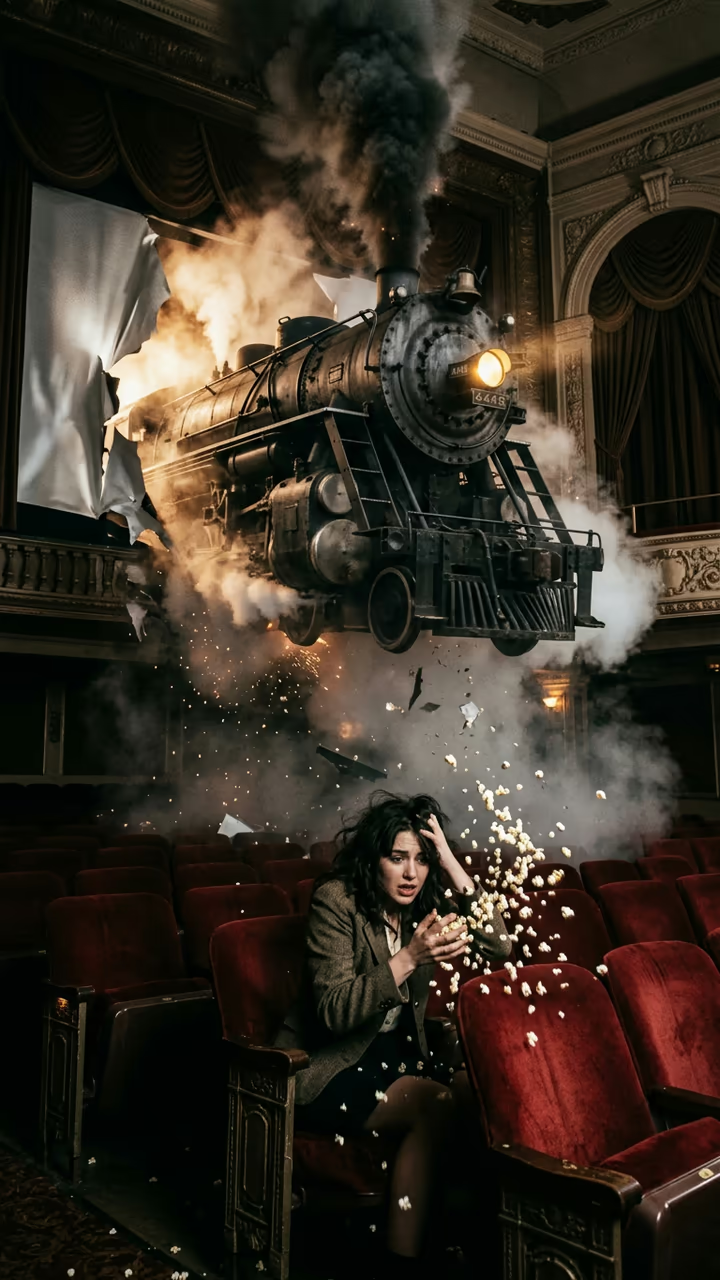
You sit in the front row and the train on the screen bursts into the cinema, stopping right above your seat.

Cinema Breakout · switch effect

Your photo

One adult, face clearly visible, upper body in frame

Cost shown before you run · failed runs are refunded

  • Ready in 1–3 min
  • No watermark
  • Failed runs refunded
  • Uploads never published

This trend on Instagram & TikTok

The most-watched videos of this trend, shown with credit and a link to each original post. Videos belong to their creators; they were not made with Soracai.

  1. 1

    @kennyslowbird

    Trend video

    TikTok

    154.7M views · 17.3M likes · September 7

    The front-row clip that started the trend

    Watch on TikTok ↗
  2. 2

    @foq.jkwba

    Trend video

    TikTok

    27.5M views · 2.82M likes · September 11

    A train rolls out of a dark tunnel screen

    Watch on TikTok ↗
  3. 3

    @user2111443955792

    Trend video

    TikTok

    15.7M views · 575K likes · September 19

    Front-row seats, many breakouts

    Watch on TikTok ↗
  4. 4

    @4dxmadness

    Trend video

    TikTok

    4.73M views · 386K likes · September 21

    A shark leaves the screen

    Watch on TikTok ↗
  5. 5

    @lucasthepuglife

    Trend video

    TikTok

    1.99M views · 237K likes · September 9

    Pet version: a dinosaur leans out at a pug

    Watch on TikTok ↗

How to use the AI Cinema Breakout Video

  1. 01

    Upload a photo

    Your photo: One adult, face clearly visible, upper body in frame.

  2. 02

    Press Generate

    The Cinema Breakout effect runs on its own tuned settings. It costs 140 credits, shown on the button before you run it.

  3. 03

    Download

    Your video is ready in one to three minutes. Download the MP4 without a watermark.

AI Fantasy Effects

What is the AI Cinema Breakout Video?

The AI cinema breakout template drops you into the front row of an old movie theatre for the moment every early film audience feared. Your photo becomes the opening frame: you sit in a red velvet seat, turned back toward a friend filming from the second row, holding a bucket of popcorn. Behind you, a black-and-white steam locomotive on the giant screen is heading straight at the audience. Then the train keeps coming. It tears through the screen in full colour, steam and sparks fill the room, and the engine rolls over the first rows before stopping with a hiss right above your seat. You scream, the popcorn goes flying, you duck, and then you turn to the camera laughing.

The format went viral on TikTok in September 2026, when a front-row clip of a train leaving the screen passed 150 million views and the same creator's follow-ups added tens of millions more. It plays on the old story of the 1896 audience who supposedly ran from a filmed train, and the shaky phone framing makes it feel like something that just happened at the cinema.

The template runs in two steps: an image model builds the cinema scene from your photo, then a video model animates the breakout with sound. You don't write a prompt. The clip is 8 seconds, vertical and watermark-free. The trend videos on this page are credited to their original creators; the poster image is AI-generated.

How the breakout is built

The first step is a still photo: you in the front row, seen from the second row, with the train on the screen behind you. Getting that frame right matters, because the video model only has to make the train move toward the camera and your reaction follow.

The second step is the breakout itself. The screen tears, the engine rolls out in colour, steam fills the room and the train stops above your seat. The camera is meant to shake like a phone in someone's hand, which is why the clip reads as real footage rather than a film scene.

Why the trend works

The joke is old: early cinema audiences were said to flinch at a filmed train arriving at a station. The AI version finally lets the train arrive. The setting is calm and familiar, then something impossible happens in one continuous shot, and the reaction gives viewers a reason to rewatch. Posts that do well keep the caption short and let the scream carry it.

AI Cinema Breakout Video FAQ

How do I make the AI cinema breakout video?

Upload one clear photo and press Generate. The template builds the cinema scene from your photo, then animates the train breaking out of the screen. It takes a few minutes.

Is it free?

Video templates use paid credits. New accounts get free credits for photo templates only. The exact cost is shown on the Generate button before you confirm.

Does the video have sound?

Yes: a train whistle, the engine roar, screams and laughter. You can mute it and add your own sound.

Can I use a friend's photo?

Only with their permission, and only adults. Do not use it to scare or embarrass anyone, and label it as AI when you post.

Why does the train look different each time?

Every run is generated fresh, so the engine, the steam and your reaction change between takes. Run it again if you want another version.

Is there a watermark?

No watermark is added to the video.

Where is my photo stored?

Uploads are stored in Firebase Storage (Google Cloud) under your account so the run can happen and the result appears in Creations. They are not public, and you can email support to request deletion. To run the effect, a copy is sent to our AI model provider (kie.ai); result files are kept for 14 days, so download what you want to keep.

More AI effects

Try the AI Cinema Breakout Video

Upload a photo and get your video in a couple of minutes.

Upload photo