

Skip to content

Whiny Dog AI Video

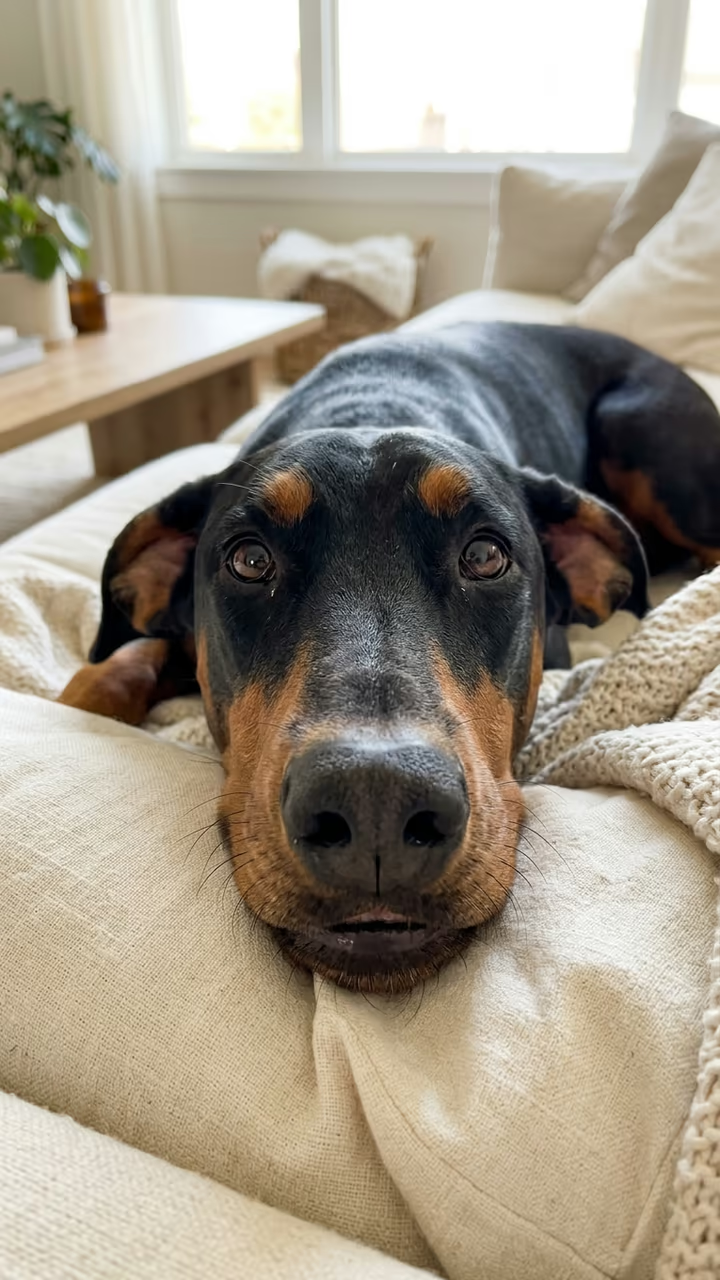
Your dog or cat stares into the phone and whines dramatically, again and again, then flashes a big toothy grin.

Whiny Dog · switch effect

Your pet's photo

Dog or cat, face clear and close, eyes visible

Cost shown before you run · failed runs are refunded

  • Ready in 1–3 min
  • No watermark
  • Failed runs refunded
  • Uploads never published

This trend on Instagram & TikTok

The most-watched videos of this trend, shown with credit and a link to each original post. Videos belong to their creators; they were not made with Soracai.

  1. 1

    @samgam81

    Trend video

    TikTok

    33.8M views · 5.7M likes · September 23

    The original whiny Doberman

    Watch on TikTok ↗
  2. 2

    @mfyls20

    Trend video

    TikTok

    19.1M views · 1.82M likes · September 26

    The top edit of the clip

    Watch on TikTok ↗
  3. 3

    @eddiemleskalicale

    Trend video

    TikTok

    1.7M views · 153K likes · September 29

    How to make the whiny puppy video

    Watch on TikTok ↗
  4. 4

    @memescreens

    Trend video

    TikTok

    1.18M views · 60K likes · October 2

    The whiny dog template

    Watch on TikTok ↗

How to use the Whiny Dog AI Video

  1. 01

    Upload a photo

    Your pet's photo: Dog or cat, face clear and close, eyes visible.

  2. 02

    Press Generate

    The Whiny Dog effect runs on its own tuned settings. It costs 140 credits, shown on the button before you run it.

  3. 03

    Download

    Your video is ready in one to three minutes. Download the MP4 without a watermark.

AI Pet Effects

What is the Whiny Dog AI Video?

The whiny dog AI template turns your pet into the most dramatic complainer on the internet. Upload a close photo of your dog or cat and you get a short, static close-up: your pet lies on a cream sofa with its head right in front of the camera, stares into the lens with big pleading eyes, and lets out a long, high-pitched whine. It pauses. It whines again, louder, mouth wide, brows up, as if something tiny has gone terribly wrong. Then it stops and flashes a big toothy grin straight at you.

The trend comes from a real Doberman. A clip of him whining on a sofa, posted on 23 September 2026, passed 33 million views and 5.7 million likes on TikTok, and its sound has been used in about 17,000 videos. Edits of the clip passed 19 million views, and a CapCut template made from it was used tens of thousands of times. The "make your own dog do it" AI version only started in mid-October, so it is still early.

The template runs in two steps: an image model puts your pet in the close-up sofa pose with its own face and markings, then a video model animates the whines and the grin with natural sound. The clip is 5 seconds, vertical and watermark-free.

Why it is a close-up

The original works because the dog's face fills the screen and stares right into the phone. The template rebuilds your photo into exactly that framing, head close to the lens on a sofa, so the whines and the grin read clearly even on a small screen.

Sound

The video model makes the sound together with the picture: natural whines and huffs, no music. Many creators add the original whining sound or a trending track on top. Mute ours in your editor if you do.

Whiny Dog AI Video FAQ

How do I make my dog whine like the meme?

Upload a clear close photo of your dog and press Generate. The template puts your dog in the close-up sofa pose and animates the whines and the grin.

Is it free?

Video templates use paid credits. New accounts get free credits for photo templates only. The exact cost is shown on the Generate button before you confirm.

Does it work with cats?

Yes. Cats and dogs both work. Other animals are hit and miss.

Will it look like my pet?

The template keeps your pet's face, fur colour and markings from the photo. A sharper, well-lit photo gives a closer match.

Does the video have sound?

Yes, natural whines and soft huffs. You can mute it and add the trending sound.

Is there a watermark?

No watermark is added to the video.

Where is my photo stored?

Uploads are stored in Firebase Storage (Google Cloud) under your account so the run can happen and the result appears in Creations. They are not public, and you can email support to request deletion. To run the effect, a copy is sent to our AI model provider (kie.ai); result files are kept for 14 days, so download what you want to keep.

More AI effects

Try the Whiny Dog AI Video

Upload a photo and get your video in a couple of minutes.

Upload photo