Skip to content

BbY WOW Trend AI Generator: The Party Walk From 1 Photo

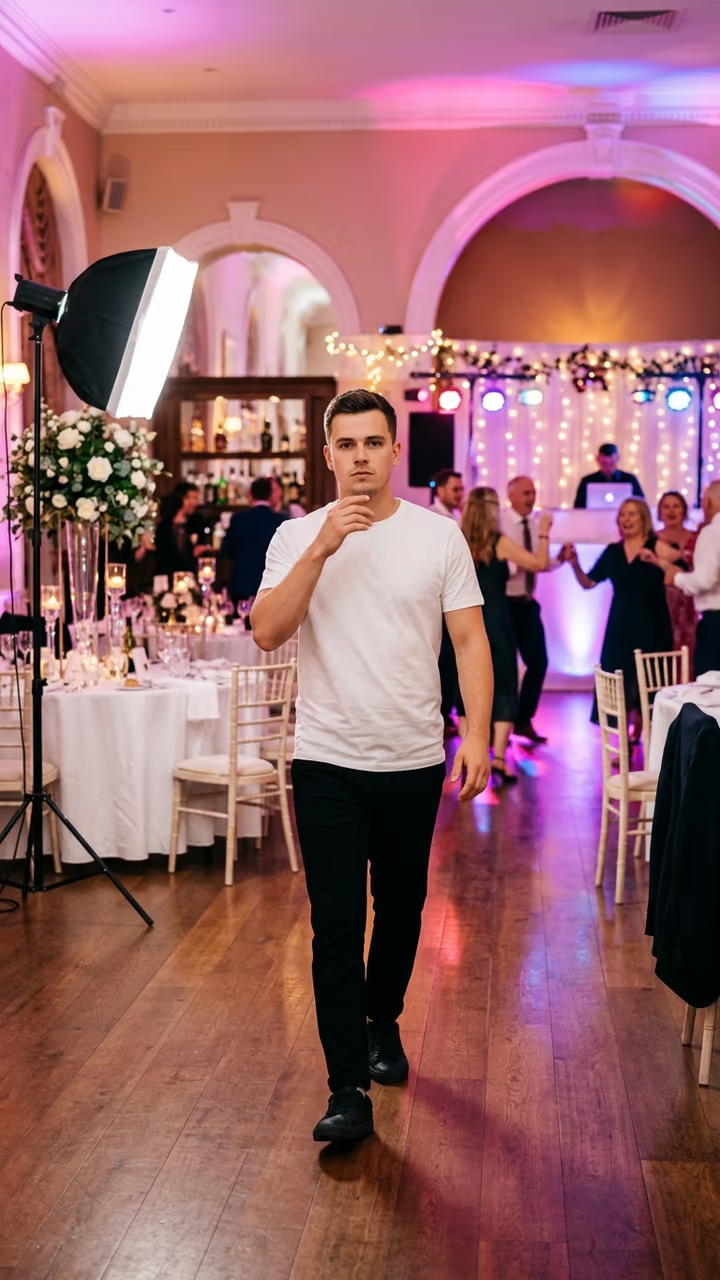
Upload one photo and you do the BbY WOW walk at a party: strolling up to the camera with a deadpan face while the lights flip from green to pink.

BbY WOW Trend · switch effect

Your photo

One adult, full body if you have it, face clear. Your outfit carries over.

Cost shown before you run · failed runs are refunded

  • Ready in 1–3 min
  • No watermark
  • Failed runs refunded
  • Uploads never published

This trend on Instagram & TikTok

The most-watched videos of this trend, shown with credit and a link to each original post. Videos belong to their creators; they were not made with Soracai.

  1. 1

    @fidaart

    Higgsfield remake

    Higgsfield

    3 views · 0 likes · October 28

    The party walk, recast

    Watch on Higgsfield ↗

How to use the BbY WOW Trend AI Generator: The Party Walk From 1 Photo

  1. 01

    Upload a photo

    Your photo: One adult, full body if you have it, face clear. Your outfit carries over..

  2. 02

    Press Generate

    The BbY WOW Trend effect runs on its own tuned settings. It costs 250 credits, shown on the button before you run it.

  3. 03

    Download

    Your video is ready in one to three minutes. Download the MP4 without a watermark.

AI Dance Effects

What is the BbY WOW Trend AI Generator: The Party Walk From 1 Photo?

The BbY WOW trend is six seconds of pure attitude. A guy at a party walks slowly toward the camera to "BbY WOW" by Karol G, Judeline and rusowsky, completely deadpan, hand to his mouth, a little nod, while the party lights flip from green to pink behind him and the guests keep dancing. The clip turned into one of the autumn's most copied party moments, and in October 2026 it became a community template on Higgsfield, where people swap themselves into the walk.

This template does the same from one photo. The model gets the walk from the party clip and your picture and redoes it shot for shot: the hall with the flower centrepieces, the softbox light, the colour change and the slow walk, with you as the one walking up to the lens. You keep your own face, hair, build and outfit.

You get a 4-second vertical video of the walk with the trend's sound on it, ready for TikTok, Reels and Shorts, with no watermark. The example videos on this page are credited to their creators on Higgsfield; the poster image is AI-generated.

How the recast works

Most photo-to-video templates start from one picture and invent the motion. This one starts from the trend clip itself: the model gets the original video and your photo, and redoes the clip shot for shot with you in it. That is why the camera, the cuts and the timing match the trend so closely. The model's own audio tends to drift, so once the video is ready we put the clip's original sound back on; the picture is untouched.

About the name

The trend is named after the song it uses. Soracai is not affiliated with Karol G, Judeline, rusowsky, the song's rights holders, the people in the original clip or Higgsfield. Only upload your own photo or a photo of an adult who agreed.

BbY WOW Trend AI Generator: The Party Walk From 1 Photo FAQ

What is the BbY WOW trend?

A party clip set to the song "BbY WOW": someone walks slowly up to the camera with a deadpan face while the party lights change behind them. People now recast it with AI so they are the one walking.

How do I make it?

Upload one clear photo of yourself and press Generate. You get a 4-second vertical video of you doing the walk, with the sound on it.

Is the person in the video a real person?

The original clip is real, but the template replaces him with you. Don't upload photos of other people without their permission.

Is this the Higgsfield template?

It is the same idea. The BbY WOW party clip became a community "make your version" template on Higgsfield in October 2026, where people swap themselves into the clip. This page makes the same recast on Soracai. Soracai is not affiliated with Higgsfield; the example videos on this page are credited to their Higgsfield creators.

How long does it take?

About 10 to 15 minutes, because the model redoes the whole trend clip frame by frame. You can leave the page; the video is saved to your Creations when it is ready.

Is it free?

Video templates use paid credits. New accounts get free credits for photo templates only. The exact cost is shown on the Generate button before you confirm.

Is there a watermark?

No watermark is added to the video.

Where is my photo stored?

Uploads are stored in Firebase Storage (Google Cloud) under your account so the run can happen and the result appears in Creations. They are not public, and you can email support to request deletion. To run the effect, a copy is sent to our AI model provider (kie.ai); result files are kept for 14 days, so download what you want to keep.

More AI effects

Try the BbY WOW Trend AI Generator: The Party Walk From 1 Photo

Upload a photo and get your video in a couple of minutes.

Upload photo